Affiliate Funnels That Survive Account Bans (Google, Meta, TikTok)
Account bans are no longer rare. Learn how affiliates build resilient funnels using pre-sell, account warming, redundancy, and compliance-first architecture.


An account that starts posting on day one looks like a risk to TikTok, and the penalties are familiar to anyone running traffic there: 0 views, the 200-view jail, or a quiet shadow ban with no notification. Warm-up is the fix, and it runs on a principle this guide keeps returning to: build trust first, scale later. It's less about tricking the algorithm than about looking like a normal user before you behave like a marketer.
For affiliates the stakes multiply with account count: one burned profile is an annoyance, a hundred is a dead funnel, so operators treat warm-up as infrastructure rather than a checklist.
Below: what a TikTok shadow ban actually is and how to tell it apart from 0 views or 200-view jail, a warm-up schedule broken down for the first four weeks, how to match warmed accounts to the right offers, and where GeeLark cloud phones fit once you're scaling.
A TikTok shadow ban usually means your account or content becomes less visible without a clear ban notice. You can still log in, upload videos, browse the app, and interact with other users, but your videos may stop getting normal distribution. You may notice it through signs like a sudden drop in views, little or no For You Page traffic, weaker search visibility, or videos that only seem to reach existing followers. The account is not fully banned, but its reach appears limited. TikTok may not officially tell you that your account is “shadow banned.” That is why the term is often used to describe a pattern of restricted visibility rather than a confirmed account status inside the app.
It is also important not to call every low-view video a shadow ban.
A new TikTok account can have unstable performance in the beginning. Some videos may get very few views because the account is new, the content direction is unclear, the video does not hold attention, or TikTok is still testing who should see it. A better way to judge the situation is to look at trends, not one video. If one post performs badly, that is normal. If several posts in a row suddenly lose For You Page reach, search visibility, and engagement compared with your usual baseline, then it may be worth checking whether the account has a trust or visibility issue.
One reason the term shadow ban causes so much confusion is that people often use it to describe very different problems. In reality, a video with 0 views, an account stuck in "200 view jail," and a genuine visibility restriction are not always the same thing.
The biggest mistake is assuming every low-performing video means your account has been shadow banned. A new account may get very little reach on its first few posts because TikTok is still learning what the account is about and which audience should see its content. The same applies to “200 view jail.” If your videos repeatedly stop after reaching a small test audience, the issue may be content quality, weak engagement, or account trust rather than a true shadow ban.
Instead of judging one video, look for patterns. If multiple posts across several days suddenly lose For You Page exposure, search visibility, and engagement even though your content strategy has not changed, then the account may have a broader visibility problem worth investigating.
For affiliates running CPA campaigns on TikTok — app installs, VPN offers, utilities — account trust directly affects traffic economics. An account without proper warm-up gets limited reach, which means higher effective CPM and lower conversion volume regardless of offer quality. This is why operators working with networks like CIPIAI increasingly treat account infrastructure as a separate optimization layer, not an afterthought.
In 2026, TikTok account warm-up is about building enough normal, consistent signals so the account does not look risky from the beginning.
TikTok does not judge a new account by one single action. It looks at patterns. A new account with a blank profile, unstable login environment, random engagement, and rushed posting behavior will usually look less trustworthy than an account that behaves like a real user from day one.
A complete profile helps a new account look less like a temporary or mass-created account. At minimum, add a clear profile photo, write a short bio, and make sure the account identity matches the type of content you plan to post. You do not need to make the profile perfect on day one. But leaving the profile blank while posting videos immediately is usually not a good start. The profile should give TikTok and real users a basic idea of what the account is about.
Email or phone verification is a simple but important trust signal. It shows that the account is connected to real contact information instead of looking like a low-quality throwaway account. If TikTok asks you to verify your email or phone number, complete it early. For new accounts, this is one of the easiest ways to reduce unnecessary account risk before you begin posting regularly.
A stable login environment matters, especially if you manage more than one TikTok account. If the same account keeps switching between devices, browsers, IPs, countries, or login locations, the activity can look unusual A safer approach is to keep each account tied to a consistent device environment, IP range, and region whenever possible. This does not guarantee reach, but it helps avoid unnecessary trust problems caused by unstable login behavior.
IP and location signals should also make sense for the account. For example, if an account is positioned for a specific region, but its login location keeps jumping between unrelated countries, that can create extra risk. Try to keep the account’s network environment stable. Avoid frequent region changes, unstable proxies, or sudden location shifts, especially during the first few weeks. For accounts targeting different markets, separate and consistent environments are safer than mixing everything together.
A TikTok account should not behave only like a publishing tool. Before and after posting, it should also act like a normal user. That means watching videos, searching for topics, spending time on relevant content, saving useful posts, and interacting lightly with videos in the same niche. If an account only uploads content but never consumes anything, its behavior can look one-sided.
Engagement should be moderate and selective. Liking hundreds of videos, following too many accounts, copying the same comment, or repeatedly following and unfollowing users can all look unnatural. A better approach is to interact with content you would realistically care about: like a few relevant videos, save useful examples, follow a small number of niche-related accounts, and leave comments only when they make sense.
TikTok needs a clear idea of what your account is about. If your activity jumps between beauty, gaming, finance, pets, and e-commerce in the first few days, the account sends confusing signals. A consistent niche helps TikTok understand your content direction and possible audience. This does not mean every video must be identical, but your early browsing, follows, and posts should point in the same general direction.
A new account should not post too aggressively before it has any activity history. Posting ten videos on the first day may look rushed, especially if the account has not browsed, followed, or interacted like a normal user yet. Start slowly, observe how the account responds, and increase posting frequency only after the account has built some normal behavior. A steady rhythm is usually safer than sudden bursts.
A healthy TikTok account should look like it belongs to someone who actually uses the platform. It should not only upload videos and disappear. This is especially important after warm-up. Continue browsing, searching, watching, saving, and interacting with relevant content. The goal is to build a long-term account pattern that looks natural, focused, and stable. That is what makes warm-up useful in 2026: it helps the account build trust before you scale posting, add links, use automation, or manage multiple accounts at once.
There is no official TikTok warm-up formula. Ask ten experienced operators how they warm up a new account, and you will probably get ten slightly different answers. However, most successful warm-up strategies follow the same principle: Build trust first. Scale later. The goal is not to get viral views during the first week. The goal is to build a normal account history, establish clear niche signals, and avoid creating unnecessary risk signals before TikTok has enough data to understand the account.
Before thinking about content, make sure the account environment makes sense. A surprising number of account trust issues start before the first video is uploaded.
TikTok uses various signals to understand where an account is located.
For example:
You do not need to obsess over every technical detail, but your signals should generally point in the same direction. An account targeting the US market that appears to be logging in from multiple unrelated countries during its first week may create unnecessary trust issues. The goal is consistency, not perfection.
Many experienced operators follow a simple rule: One account = one device environment. This does not mean you literally need one physical phone for every account. The principle is that each account should have its own stable environment and activity history.
Problems often appear when:
The more stable the environment, the easier it is to build account trust.
The biggest mistake many people make is treating a brand-new account like a mature account. They create it and immediately: upload vidoes, add links, follow dozens of people and start promoting products. Instead, spend the first day setting up the account properly.
Some people prefer to leave a new account inactive for 24–48 hours before beginning warm-up activities. Others start browsing immediately. There is no strong evidence that one approach always works better. If you choose to use a sleeping period, keep it short. The more important factor is what happens during the first week, not whether the account sits idle for one day.
During the next two days, continue using the account naturally. Watch content in your niche, spend more time on videos that are actually relevant, and interact lightly with posts that make sense. You can like a few videos, save useful examples, and follow a small number of relevant accounts. Do not turn this into a checklist of actions to complete as fast as possible. The behavior should look like a real person exploring a topic, not a bot trying to generate activity.
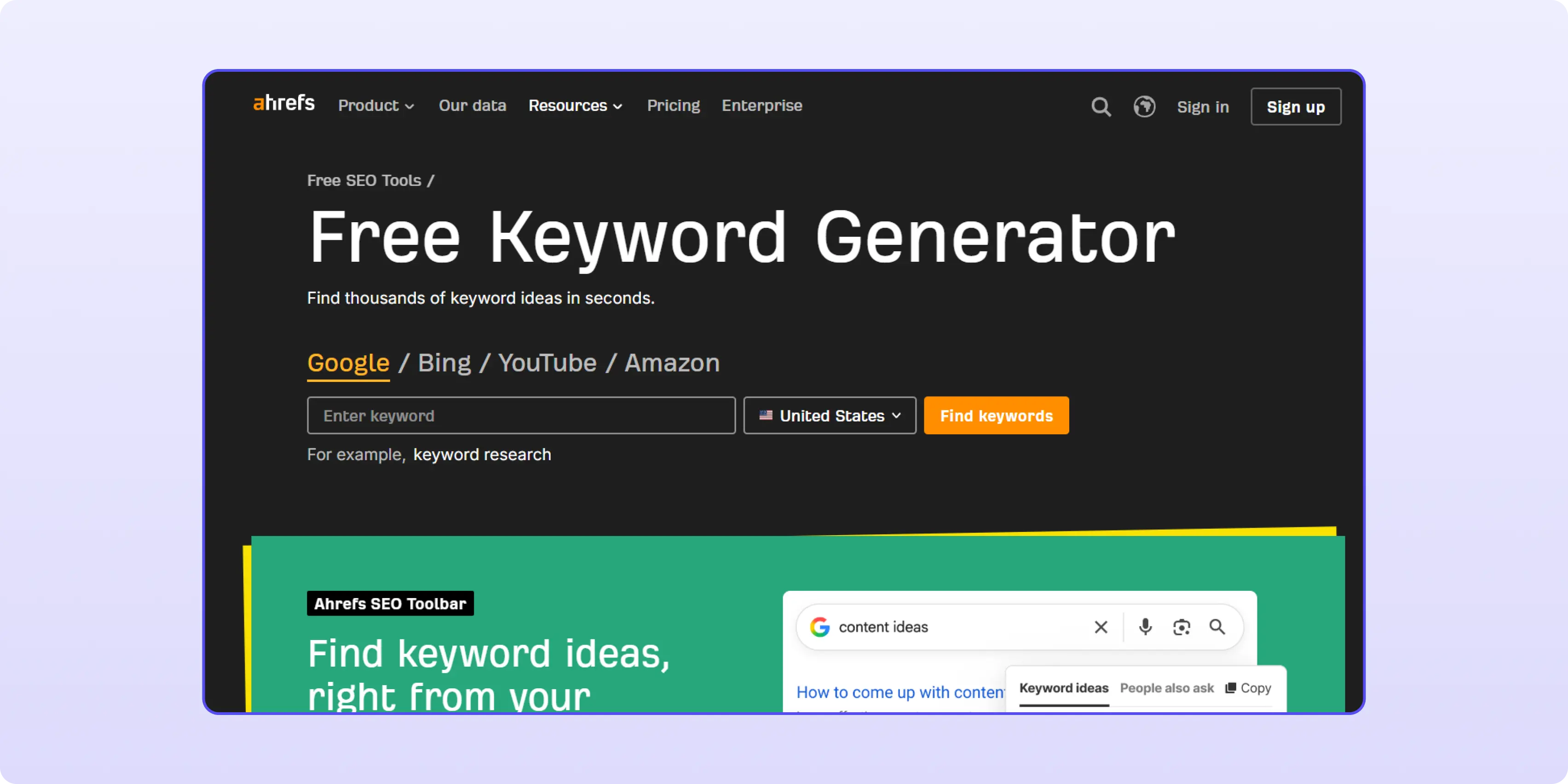
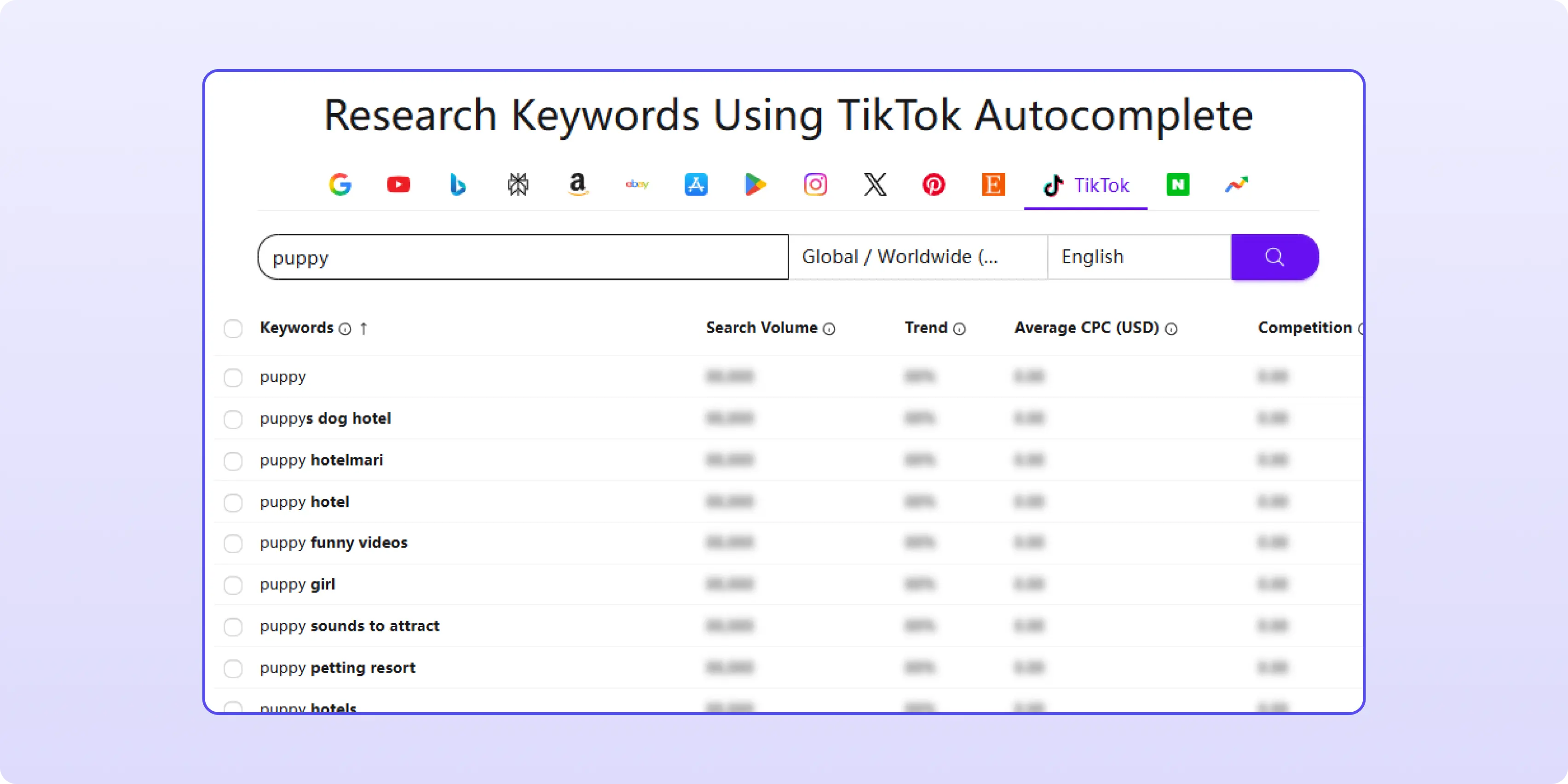
Search activity is often overlooked during TikTok warm-up, but it can give TikTok extra context about what your account is interested in. Instead of only relying on the For You Page, use search to find videos, creators, and topics related to your niche. You do not need to guess every keyword yourself. Free keyword tools can help you expand your search ideas.
For example, Ahrefs offers a free keyword generator where you can enter the main keyword for your niche and get related keyword suggestions. You can then search some of those terms on TikTok and use them to find videos to watch, save, or like.
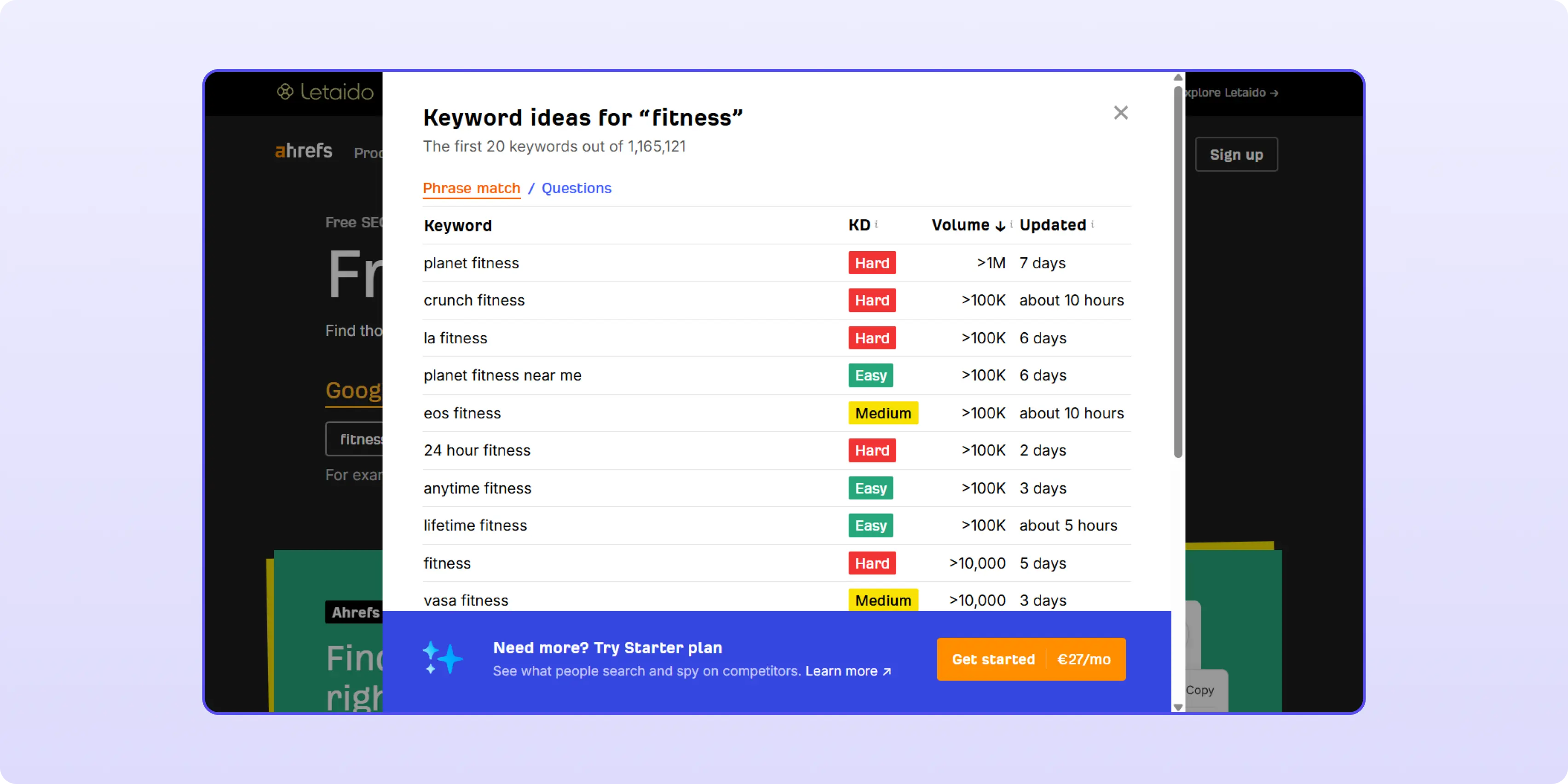
You can also use tools like Keyword Tool to discover more keyword variations. The free version may not show full search volume data, but it is still useful for expanding your topic list. A single niche keyword can lead you to related questions, subtopics, and content angles that help you browse TikTok more intentionally during the warm-up stage.
By this point, TikTok should already have a basic idea of your interests and content direction. The next step is to strengthen those signals. Keep watching, saving, and engaging with content in the same niche. This helps TikTok build a clearer picture of what your account is about and which audience your future videos may fit.
In the first few weeks, your account should send signals around one general audience. For example, if you plan to post fitness content, your browsing, follows, saves, and first videos should mostly stay around fitness, workouts, nutrition, or healthy lifestyle topics.
This does not mean every video must look the same. You can test different formats, such as tutorials, reactions, product reviews, or short tips, but they should still make sense for the same type of viewer. If your account jumps from fitness to crypto, then to pet videos, then to cooking, TikTok has less context for who should see your content first.
Many operators skip this step. Watching live streams can help create natural usage patterns because:
You do not need to spend hours watching lives. Even short sessions can help diversify activity patterns.
For most new accounts, one video a day is enough at this stage. The purpose is not to post as much as possible, but to help TikTok understand what kind of content your account creates and which audience may be interested in it.
At this stage, you should start looking at a few basic performance signals:
These signals can help you understand whether the account is starting to gain stable distribution or still needs more time and adjustment.
If your first video gets 0 views, or only a small number like 30 views, do not assume the account is shadow banned right away. New TikTok accounts often go through unstable distribution, and early videos may take time to move.
A safer response is to slow down and observe. Wait 24 to 72 hours, continue using the account normally, watch more videos in your niche, and then upload another clean, niche-consistent video. Do not rush into deleting, reposting, or changing everything at once.
You need a small sample of posts before judging account health. After several videos, look at the overall pattern: whether views begin to move, whether any video reaches the For You Page, and whether engagement starts to appear naturally. One low-view video is not enough to diagnose a shadow ban.
By weeks 3 and 4, the account has moved into a different stage. Your goal is no longer just to warm it up, but to keep a stable rhythm and behave like a real TikTok user: publishing content while still consuming content.
Keep your posting schedule steady.
Do not post three videos on Monday, disappear for ten days, and then suddenly post again. A consistent schedule gives the account a cleaner activity pattern.
You should also continue normal user behavior.
Do not open TikTok only when you need to upload a video. Keep watching content in your niche, saving strong examples, liking occasionally, searching niche-related keywords, and following useful creators in your industry.
At the same time, start reviewing performance trends.
Look at your most recent 5 to 10 videos and check how they are performing as a group.
After about one month, if the account is stable and there are no obvious trust issues, you can start testing more actively. The key is to scale step by step instead of changing everything at once.
At this stage, you can test:
This is also where a multi-account strategy can be useful. Different accounts can test different niches, formats, regions, or posting styles, so you can see what actually works instead of relying on one account for every experiment.
Matching Your Traffic to the Right Offers
Once accounts are warm and distribution is stable, offer selection becomes the next optimization variable. TikTok’s mobile-first audience responds well to app installs, VPN, and utility offers — particularly in Tier 1 GEOs where purchase intent is higher and payouts reflect that.
The key is matching offer GEO to account GEO. An account warmed up for a US audience shouldn’t be running BR offers — the behavioral signals and audience context won’t align. CPA networks like CIPIAI cover 200+ GEOs with direct mobile app, VPN, and utility offers, and support S2S postback setup for attribution tracking across multiple accounts. For operators scaling TikTok traffic to CPA, having per-GEO offer coverage without payout delays matters as much as the account infrastructure.
Get access to VPN, mobile app, and utility CPA offers at cipiai.com
If you are managing multiple TikTok accounts, using GeeLark’s cloud phones for account management and warm-up can be a practical way to keep each account separated and easier to control.
TikTok is a mobile-first platform. Most user activity happens on smartphones, and TikTok is designed around mobile devices rather than desktop computers. Because of this, many people prefer to warm up accounts in a real Android environment instead of relying on browser-based workflows or traditional Android emulators running on desktop machines.
GeeLark provides cloud phones that run in a native Android environment. Each cloud phone operates on ARM-based mobile hardware architecture, similar to how a real Android device works. From TikTok's perspective, the account is being used on an actual Android phone rather than through an emulator running on a desktop computer.
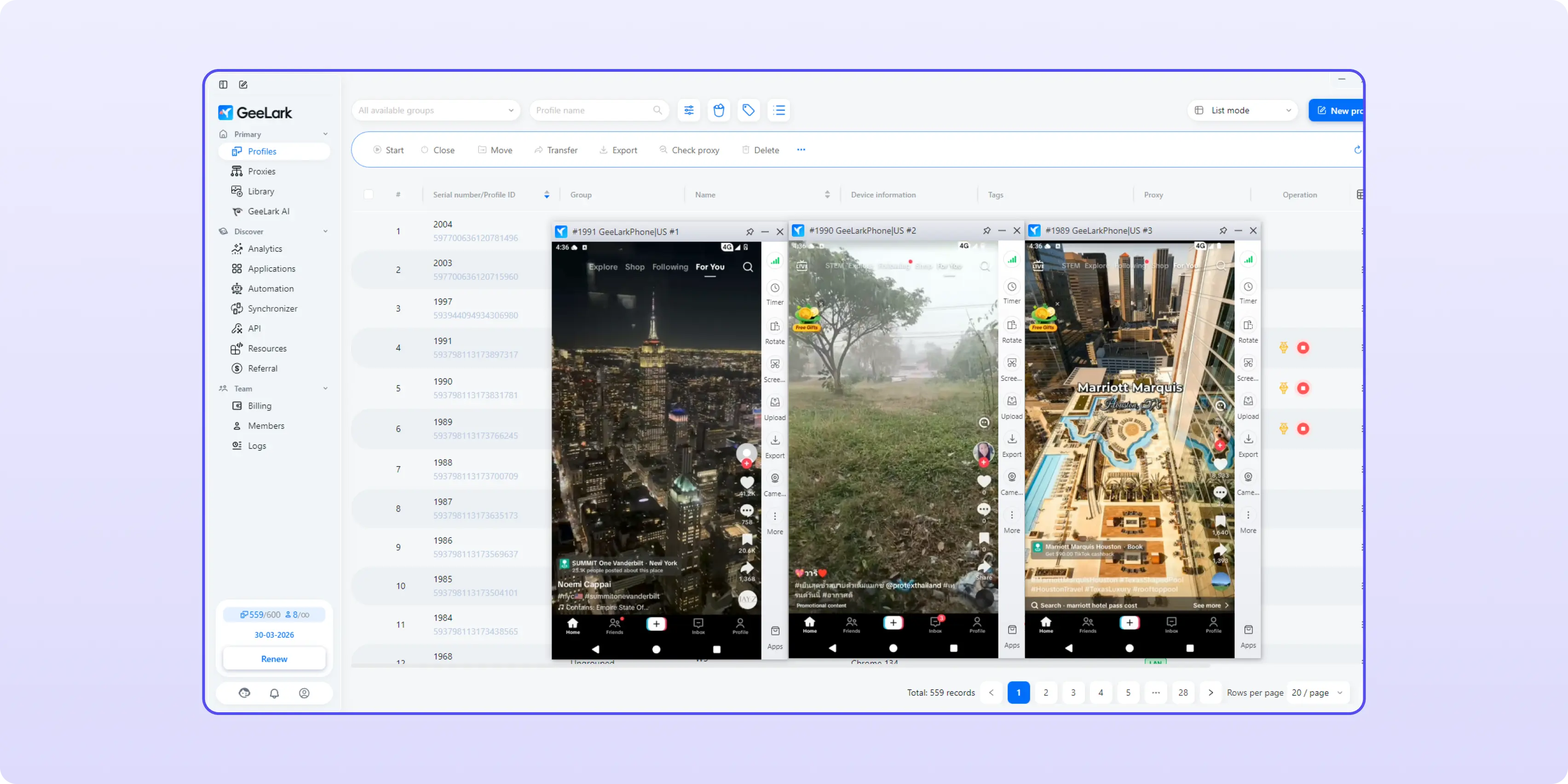
One of the most common principles in multi-account management is: one account, one environment.
Every TikTok account gradually builds a history based on its device signals and usage patterns. Each GeeLark cloud phone has its own device fingerprint, including information such as:
This means each account can maintain its own independent device identity. This helps reduce the risk of accounts sharing the same device environment or generating overlapping signals.
Environment consistency is not only about the device itself. It is also about location signals. For example, imagine you are targeting the US market. If your account appears to be connecting through a US IP address, but the device time zone, language settings, and GPS location point to completely different regions, the environment becomes less consistent.
GeeLark allows you to configure proxy connections for each cloud phone. When a proxy is connected, the cloud phone can automatically align location-related settings such as GPS, time zone, and language with the selected region.
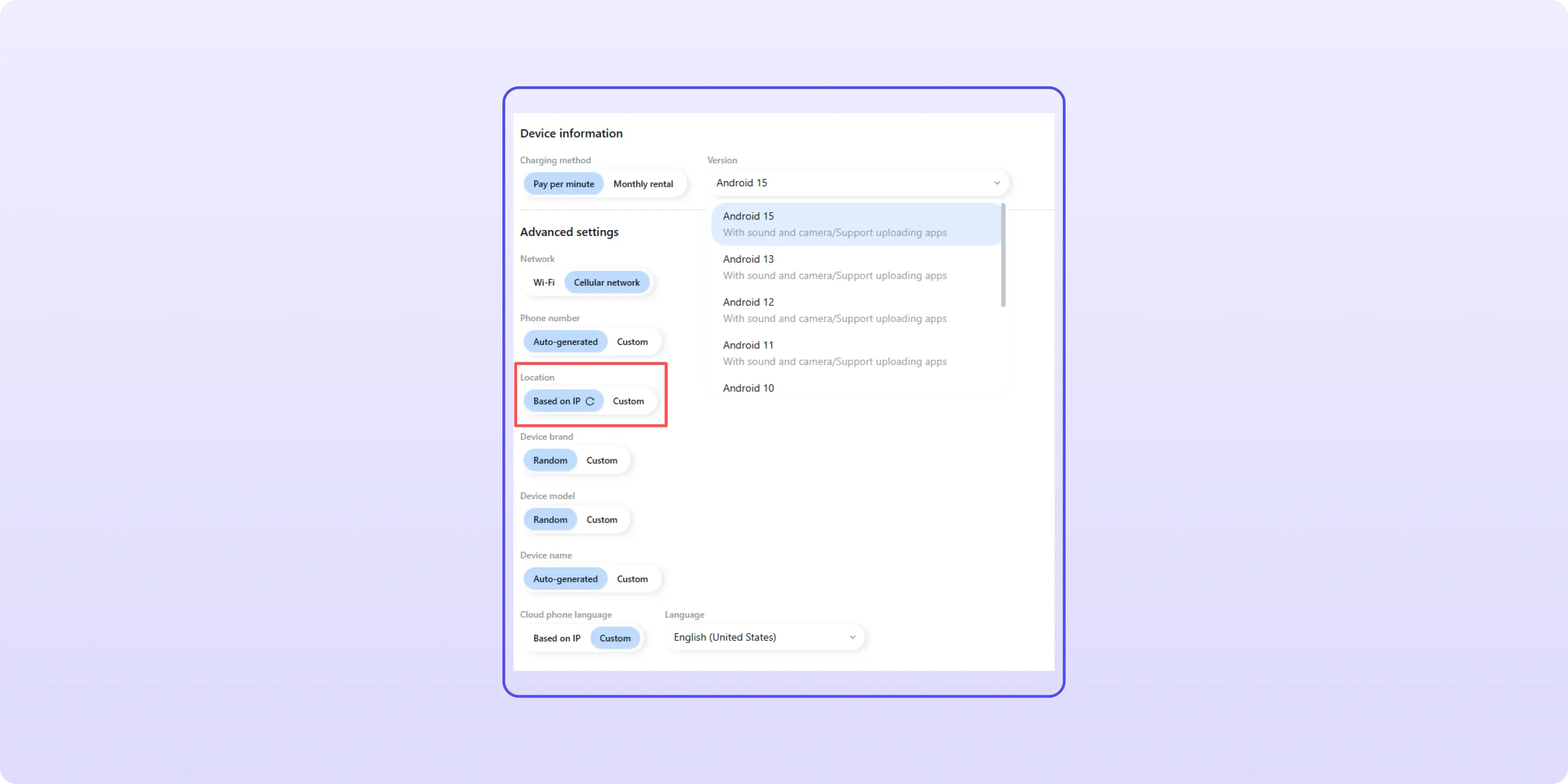
As a result, the account environment looks much more consistent. This is particularly useful for accounts targeting specific countries and regions where location relevance matters.
Even when you know the correct warm-up process, executing it across multiple accounts can become time-consuming.
Many warm-up actions are repetitive:
These tasks are simple, but they consume time when repeated across dozens of accounts. GeeLark also includes a social media automation template marketplace, where you can find ready-made workflows for TikTok warm-up and related account management tasks. For example:
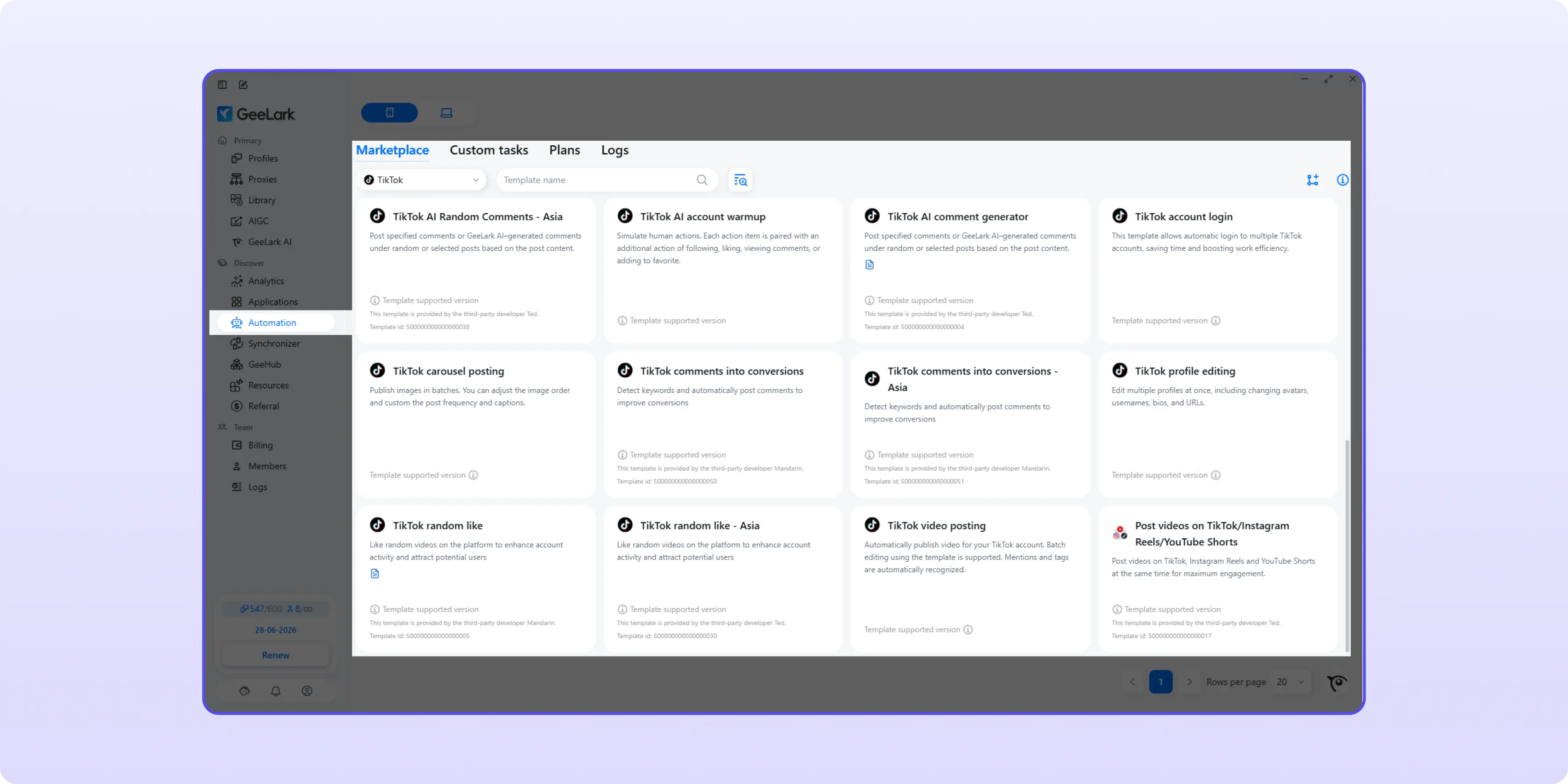
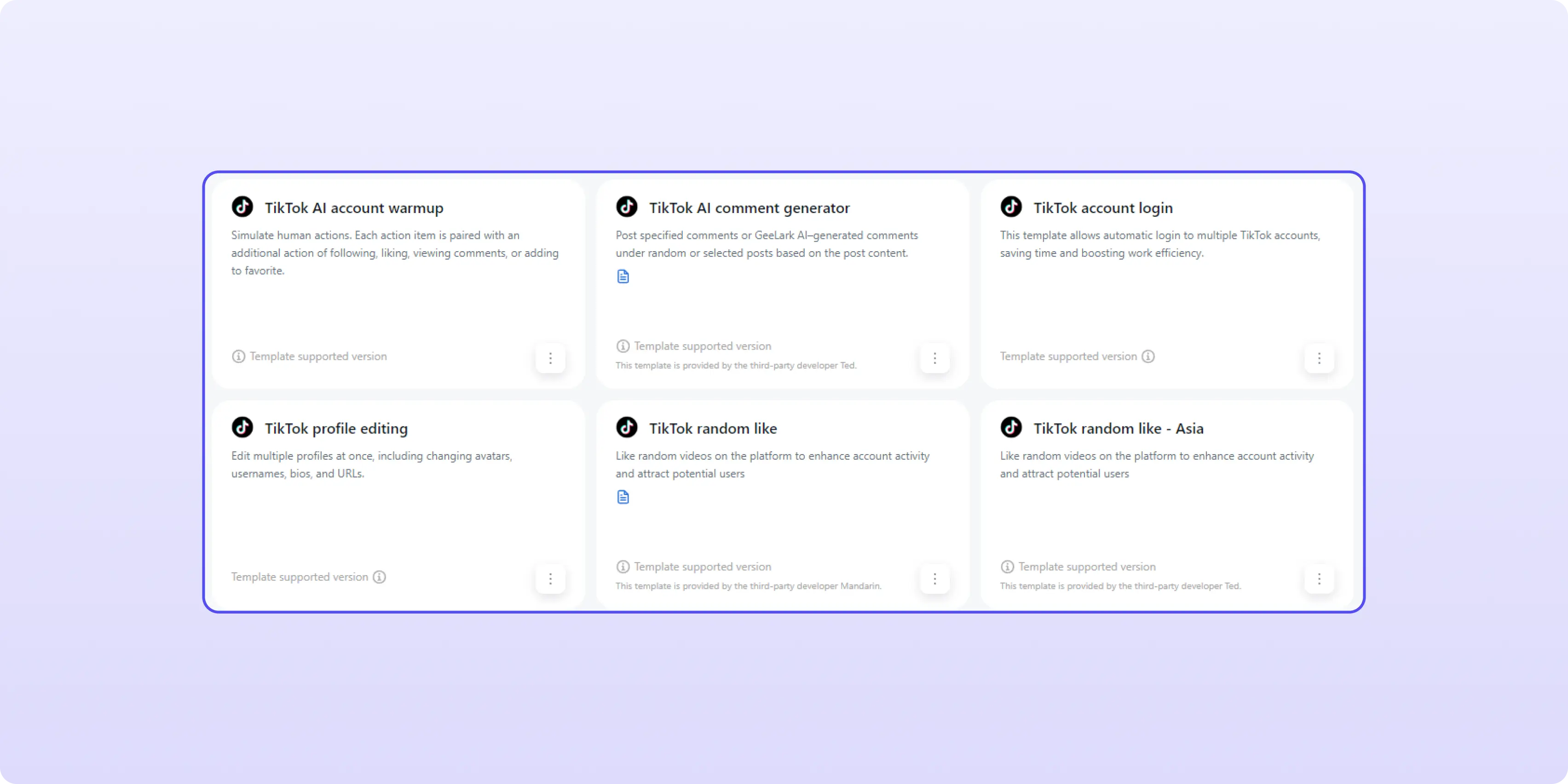
Unlike API-based automation, these workflows interact with the cloud phone in a way that resembles normal device usage. Actions are performed through screen interactions such as scrolling, tapping, and waiting between actions. The goal is not to automate everything, but to reduce repetitive manual work while maintaining more natural behavior patterns.
One challenge with international TikTok operations is that audiences are active at different times. A US audience, a UK audience, and a Southeast Asian audience may all be online at completely different hours. Because GeeLark's automation runs entirely in the cloud, tasks can continue running even when your local computer is turned off. This makes it easier to maintain warm-up schedules and account activity patterns across multiple regions without needing to stay online around the clock.
GeeLark does not guarantee that a TikTok account will avoid a shadow ban. No tool can do that. Content quality, account trust, policy compliance, audience response, and posting strategy still play a major role.
What GeeLark can do is make the operational side of account warm-up easier to manage. For people managing multiple TikTok accounts, it provides a structured way to maintain separate environments, automate repetitive work, and execute warm-up workflows more consistently.
TikTok warm-up is not a shortcut. It is a trust-building process. In 2026, the accounts that last longer are usually not the ones that post the most aggressively from day one. They are the accounts that build stable behavior, clear niche signals, consistent posting habits, and a safer operating environment before scaling.
If you are managing many accounts, tools like GeeLark can help keep environments separated and workflows more consistent. Either way, the goal is the same: make the account look real, focused, and low-risk before asking TikTok to distribute its content at scale.
A shadow ban on TikTok is a visibility restriction where your videos stop receiving normal For You Page distribution without any official notice. Signs include a sudden and sustained drop in views, disappearance from search results, and engagement only from existing followers rather than new audiences. Unlike a single low-performing video, a shadow ban affects multiple posts in a row.
There is no confirmed official timeline. Based on community reports and operator experience, visibility restrictions typically last between 1 and 2 weeks when caused by behavioral signals. Restrictions tied to repeated policy violations may last longer or persist until the underlying behavior changes.
The most reliable approach is to stop aggressive or spam-like behavior, return to normal usage patterns, and give the account time to recover. Avoid rapid posting, mass follows, repeated comments, or sudden spikes in activity. If the restriction is mild, consistent natural behavior over 7–14 days usually helps restore reach.
Usually, no. A common warm-up recommendation is to avoid posting in the first 24 hours and use the account like a normal user first. That helps the account build more natural early signals before TikTok starts evaluating your content for distribution.
It can be. Your first few videos getting 0 views does not always mean the account is dead or shadow banned. New accounts often go through unstable distribution. Continue posting, give the account a few days, and look at a larger sample of posts before drawing conclusions.
Yes, but automation should be moderate and realistic. Avoid excessive actions, repeated patterns, or identical behavior across accounts. Tools like GeeLark simulate natural Android device usage rather than API-based automation, which makes the activity patterns more credible. Automation should support warm-up activity, not replace account quality or human judgment.
Use the account like a real person. Complete the profile, verify email or phone, watch content in your niche, like and save naturally, search niche-related keywords, and avoid any spam-like behavior. The goal is to help TikTok see consistent, normal user signals and understand your content direction before you start posting.


Bisdev Solutions Limited
Room 701, 7/F, Lucky Centre, 165-171
Wanchai Road, Wan Chai, Hong Kong China
Copyright © 2026. Bisdev Solutions Limited
All rights reserved